Getting Started with cURL
In this Blog we will go through a complete deep knowledge about a server, cURL. Learn how to talk to servers from the terminal using simple commands

Turning chai into code and ideas into full-stack applications. Sharing lessons from my development journey, one commit at a time.
Getting Started with cURL: A Beginner-Friendly Guide
When you open a website in your browser or use a mobile app, your device is constantly talking to servers. But what if you want to send messages to a server yourself - without a browser?
That’s where cURL comes in.
In this blog, we’ll understand what cURL is, why programmers use it, and how to make your first request using simple commands. No overload, no confusing flags - just clear basics.
A Server
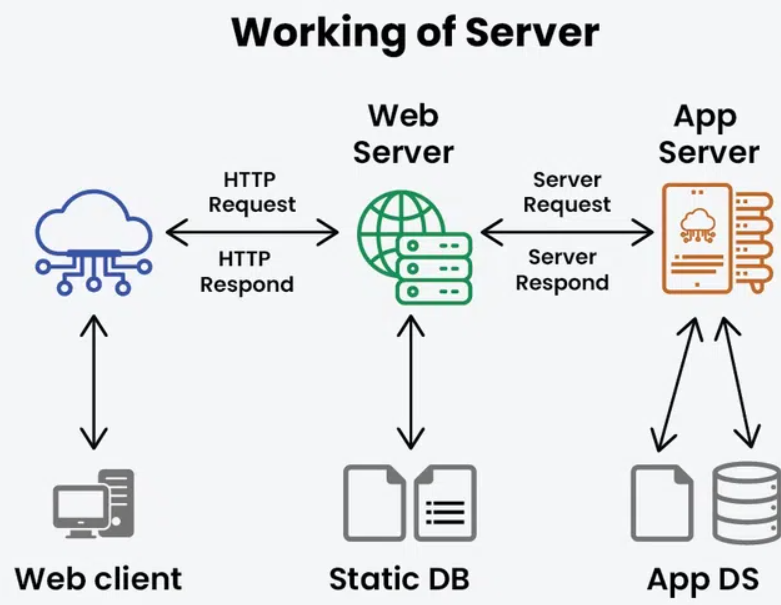
First we got the question what is a Server? Where does lies? How do we access a server. Let’s know what is a server refers to : A server is just a computer that is connected to the network, whose job is to wait and respond.
In other terms, A server is a computer or system that provides resources, data, services, or programs to other computers, known as clients, over a network
A server is a computer that stores data or provides services (websites, APIs, files).
When you open
google.com, your browser sends a request to Google’s server asking for the page.The server sends back a response containing the data (HTML, JSON, images, etc.).
Working of Server
You (client) send a message to a restaurant (server) asking for food (data).
The restaurant sends back your order (response).
Why We Need to Talk to a Server
Every app or website you use depends on talking to a server.
When you:
Open a website
Log into an app
Fetch user data
Submit a form
Upload a photo
Your device is actually sending a message to a server asking for something.
Flow of cURL
Client (you) → Server → Response (data or confirmation)
Why this communication is necessary
We need to talk to servers because:
Data lives on servers: Your profile, posts, messages, and files are stored on remote machines.
Apps don’t work offline: Most modern apps depend on real-time server data.
Multiple users share the same data: Servers keep everything consistent across devices.
Security and authentication: Servers verify who you are before giving access to data.
Business logic runs on servers: Payments, validations, and workflows happen server-side.
Example
Talking to a server is like visiting a bank counter:
You as a client request money or information
The bank acts as a server verifies your identity
The bank gives you the result as response
How this connects to cURL
Normally, your browser talks to servers for you.
But developers use cURL when they want to:
Send direct requests
Test APIs
Debug server responses
Automate interactions
Learn how real communication works
So before learning cURL, it’s important to understand:
cURL is just a way to talk to a server - without a browser.
What Is cURL
cURL is a command-line tool used to send requests to servers and receive responses.
It lets you talk to a server from the terminal, just like a browser does.
- Full form: Client URL
If a browser is a fancy restaurant ordering app, then cURL is a simple phone call or a Menu QR to place the same order.
Installation
cURL comes pre-installed on most macOS and Linux systems, as well as in Windows.
Open your terminal (Command Prompt, PowerShell, or Bash).
curl --versionIf installed, you will see version information. As mentioned below:
  C:\Users\Jyoti>curl --version
  curl 8.16.0 (Windows) libcurl/8.16.0 Schannel zlib/1.3.1 WinIDN
  Release-Date: 2025-09-10
  Protocols: dict file ftp ftps gopher gophers http https imap imaps ipfs
      ipns ldap ldaps mqtt pop3 pop3s smb smbs smtp smtps telnet tftp ws wss
  Features: alt-svc AsynchDNS HSTS HTTPS-proxy IDN IPv6 Kerberos Largefile
      libz NTLM SPNEGO SSL SSPI threadsafe Unicode UnixSockets
Why Programmers Need cURL
Developers use cURL because it:
Tests APIs without writing code
Debugs backend endpoints
Checks server responses
Automates requests in scripts
Verifies headers and status codes
Real-world use cases
Checking if an API is working
Sending test data to a backend
Fetching a webpage quickly
Debugging authentication issues
Making Your First Request Using cURL
Let’s fetch a webpage with the simplest command.
curl https://wikipedia.com
What happens:
cURL sends a GET request to
wikipedia.comThe server responds with the webpage content
cURL prints that response in your terminal
That’s it!
You’ve just talked to a server without a browser.
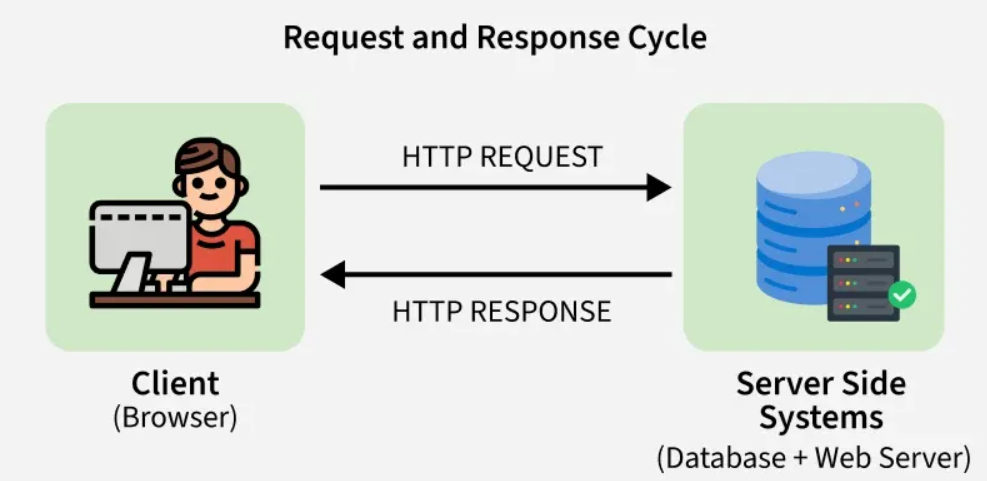
Request and Response
Every cURL interaction follows this flow:
Request
A request is what the client sends to the server.
It contains:
Method (GET, POST, etc.)
URL
Headers
(Optional) Body
Example:
GET / HTTP/1.1
Host: example.com
Response
A response is what the server sends back.
It contains:
Status code
Headers
Body (actual data)
Example:
HTTP/1.1 200 OK
Content-Type: text/html

<html>...</html>
The Response from cURL
Run This command:
curl https://api.github.com
You’ll see:
JSON data returned
No formatting
Raw response
Key things to notice:
Data returned
Whether the request succeeded
Structure of the response
GET and POST
GET
Refers to fetch data. GET is used when you want to fetch something.
curl https://api.github.com/users/octocat
POST
Used to send data to a server.
curl -X POST https://httpbin.org/post -d "name=John"
What this does:
Sends data to the server
Server responds with confirmation
Using cURL to Talk to APIs
APIs are servers designed to accept and return data. APIs are just kind of servers that talk in terms of data instead of web pages. Mostly APIs return data in JSON format, mainly includes status code, response message, and data.
Example:
curl https://api.github.com/users/octocat
What’s happening:
You send a request to an API
The API sends JSON data
You inspect the response
This is exactly how backend developers test APIs.
Common Mistakes Beginners Make with cURL
Forgetting
https://Typing incorrect URLs
Using too many flags too early
Confusing GET and POST
Not understanding response output
Assuming browser behavior equals cURL behavior
How cURL Fits in Backend Development
Tests APIs during development
Debugs production issues
Automates health checks
Validates server responses
Simulates real client requests
cURL is a daily tool for backend developers.
Conceptual Flow
cURL → Server → Response
Compare with a browser:
Browser → Server → HTML Page
cURL → Server → Raw Response
Browser vs cURL
| Browser | cURL |
| UI-based | Command-line based |
| Hides details | Shows raw response |
| Easy for users | Powerful for developers |
| Automatic | Manual & transparent |
Where does working with cURL fits in software development
cURL is not just a learning tool - it’s something real developers use every day.
In software development, applications are built using clients (browsers, mobile apps, frontend code) and servers (backend systems, APIs, databases). These two sides constantly talk to each other using HTTP requests.
cURL fits right in the middle of this communication.
How developers actually use cURL
Developers use cURL to:
Test backend APIs before the frontend is ready
Debug broken endpoints
Verify server responses and status codes
Simulate real client requests
Check authentication and headers
Automate health checks in scripts
Where it sits in the development workflow
Frontend / Mobile App
        ↓
      cURL   ← Developers test here
        ↓
      Backend API
        ↓
     Database
Why cURL matters in real projects
Faster debugging: You can isolate server issues without frontend complexity.
Backend-first development: Build and test APIs before UI exists.
Production troubleshooting: Check if a server is up or returning correct data.
Learning real HTTP behavior: See raw requests and responses instead of browser magic.
cURL is the developer’s microscope for inspecting how clients and servers communicate.
Conclusion
You Just Talked to a Server (Congrats!)
If you’ve made it this far, congratulations — you’re officially someone who can talk to servers.
No browser. No UI. No fancy buttons. Just pure terminal power. 😎
You now know that:
Servers store and serve data
cURL is a simple way to send messages to them
Requests go out, responses come back
APIs are just servers that speak JSON
GET and POST are your new best friends
At this point, you don’t need 50 flags or advanced tricks. You just need confidence and curiosity.

